

I wanted to deploy the LLM-as-a-Judge I recently developed. I want to deploy a:
Front-end: Next.js
Back-end: FastAPI
LLM integration: LangChain
I wanted a really easy way to deploy the app without handling too much of the config, similar to Heroku, Vercel, or Fly.io, but without the heavy lifting.
That’s when I stumbled on Azure Container Apps.
In this post, I’ll walk through what I learned deploying an AI evaluation system on Azure Container Apps and why this architecture is a surprisingly good fit if you’re building AI systems without a dedicated DevOps team.
A Quick Primer: AKS vs. Azure Container Apps
Azure Kubernetes Service (AKS) is Microsoft’s managed Kubernetes offering. Kubernetes itself is the industry-standard container orchestration platform. It handles deploying, scaling, and managing containerized applications across clusters of machines. “Managed” means Azure handles the control plane (the brain of the cluster), but you still manage worker nodes, networking, upgrades, and the endless YAML configuration that Kubernetes requires. AKS is powerful and flexible, which is why large engineering teams love it. But that power comes with complexity.
Azure Container Apps is a higher-level abstraction built on top of Kubernetes. The key difference: you never see or touch the Kubernetes layer. You give Azure your containers, tell it how you want them to scale and communicate, and it handles everything else: node management, networking, certificate rotation, cluster upgrades. You get the benefits of container orchestration (revisions, traffic splitting, autoscaling, managed ingress) without writing a single Kubernetes manifest.
Think of it this way: AKS gives you a fully-equipped commercial kitchen where you control every burner and oven. Container Apps gives you a meal delivery service; you provide the recipes (containers), and someone else handles the cooking infrastructure.
For solo builders and small teams, that tradeoff matters enormously.
Architecture Overview
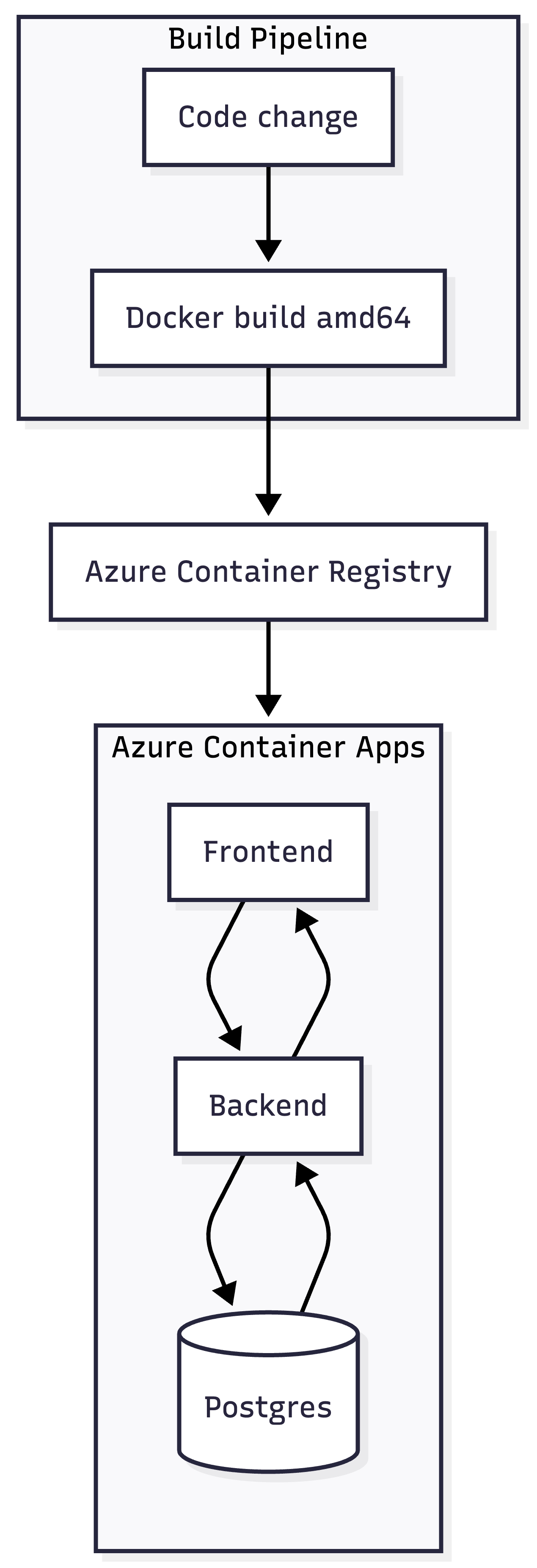
Three containers, one environment, zero Kubernetes manifests.
Let me run you through how I set this up.
Step-by-Step: First-Time Setup
Throughout this tutorial, replace these placeholders with your own values:
1. Create a resource group
az group create \
  --name <your-app>-rg \
  --location southeastasia
2. Create a Container Apps environment
az containerapp env create \
  --name <your-app>-env \
  --resource-group <your-app>-rg \
  --location southeastasia
3. Build Docker images for linux/amd64
If you're on Apple Silicon, this step matters. Azure runs amd64, so you need to build for that architecture explicitly, otherwise feel free to skip this step:
docker build \
  --platform linux/amd64 \
  -t <your-app>-backend:latest \
  ./backend

docker build \
  --platform linux/amd64 \
  -t <your-app>-frontend:latest \
  ./frontend
4. Create Azure Container Registry
az acr create \
  --resource-group <your-app>-rg \
  --name <youracr> \
  --sku Basic \
  --admin-enabled true
Note: ACR names must be globally unique and contain only alphanumeric characters (no hyphens).
5. Login, tag, and push
az acr login --name <youracr>

docker tag <your-app>-backend:latest <youracr>.azurecr.io/<your-app>-backend:latest
docker tag <your-app>-frontend:latest <youracr>.azurecr.io/<your-app>-frontend:latest

docker push <youracr>.azurecr.io/<your-app>-backend:latest
docker push <youracr>.azurecr.io/<your-app>-frontend:latest
When it finishes, Azure prints your public URLs:
https://backend.<suffix>.southeastasia.azurecontainerapps.io/
https://frontend.<suffix>.southeastasia.azurecontainerapps.io/
What You'll Run Daily
Once the infrastructure is setup, every subsequent deploy can be done on a single script deploy-demo.sh. Here’s a run-down of what the script does:
Step 1: Build images with the backend URL baked in
docker build --platform linux/amd64 -t <your-app>-backend:latest ./backend

docker build --platform linux/amd64 \
  --build-arg NEXT_PUBLIC_API_BASE=https://backend.<env-suffix>.azurecontainerapps.io \
  -t <your-app>-frontend:latest ./frontend
That NEXT_PUBLIC_API_BASE argument matters. Next.js compiles environment variables prefixed with NEXT_PUBLIC_ into the browser bundle at build time. If you don't set it here, your frontend won't know where to find your backend.
Step 2: Push to the registry
docker tag <your-app>-backend:latest <youracr>.azurecr.io/<your-app>-backend:latest
docker tag <your-app>-frontend:latest <youracr>.azurecr.io/<your-app>-frontend:latest

docker push <youracr>.azurecr.io/<your-app>-backend:latest
docker push <youracr>.azurecr.io/<your-app>-frontend:latest
Step 3: Update the container apps
az containerapp update \
  --name backend \
  --resource-group <your-app>-rg \
  --image <youracr>.azurecr.io/<your-app>-backend:latest

az containerapp update \
  --name frontend \
  --resource-group <your-app>-rg \
  --image <youracr>.azurecr.io/<your-app>-frontend:latest
Each update command creates a new revision. The new revision starts receiving traffic automatically. If something breaks, you can route traffic back to the previous revision with one command.
Step 4: Patch environment variables
FRONTEND_FQDN=$(az containerapp show --name frontend --resource-group <your-app>-rg --query "properties.configuration.ingress.fqdn" -o tsv)

az containerapp update \
  --name backend \
  --resource-group <your-app>-rg \
  --set-env-vars \
    FRONTEND_URL=https://${FRONTEND_FQDN} \
    DATABASE_URL=postgresql+psycopg2://<db-user>:<db-password>@db:5432/<db-name> \
    ENV=production
Note that DATABASE_URL points to db, the internal service name. Your Postgres instance isn't exposed to the internet, only your backend can reach it.
The complete loop
./deploy-demo.sh
  → builds amd64 images
  → pushes to ACR
  → updates container apps (creates new revisions)
  → patches environment variables
  → done
Note:
I’ve experience a few times wherein sometimes the script does not work. This happens terminal has been open for days. Run these two commands and retry:
az login
az acr login --name <youracr>
Conclusion
Azure Container Apps isn’t “AKS lite.” It’s a different tradeoff entirely: you give up control over the orchestration layer, and in exchange, you get to focus on your actual product. And for my use case, Azure Container Apps fits the bill.
If you’re building something similar and want to compare notes, I’d like to hear about it. What’s your current deploy setup, and what’s painful about it?